How Cloud Computing Is Shaping the Future of IT Infrastructure

How Cloud Computing Is Shaping the Future of IT Infrastructure

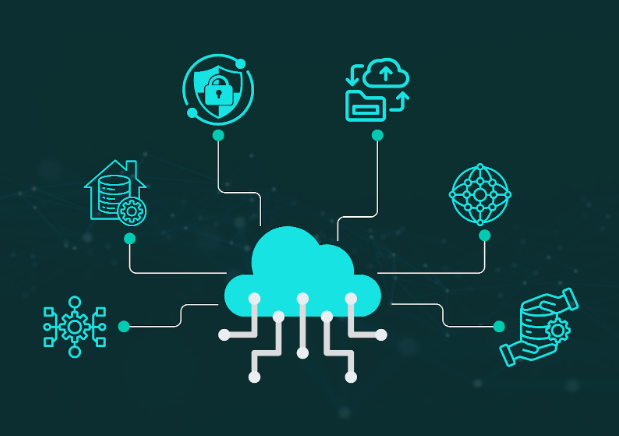
Cloud computing is rapidly shifting the IT infrastructure of businesses. Nowadays, companies are heavily dependent on cloud computing for storing their data through online services.  As cloud computing offers flexibility, scalability, and cost efficiency, the demand for bulky servers and expensive on-premise hardware is fading out. Cloud computing is the starting of the future of more advanced IT infrastructure. 

What is Cloud Computing?

Cloud computing refers to different computing services via the internet. Computing services like storage, databases, networking, software, and analytics can be handled virtually through cloud computing. It is a pay as you go service. Cloud service providers like Amazon Web Services (AWS), Microsoft Azure, and Google Cloud empower businesses to access these resources whenever they need them, eliminating the need for physical hardware. Bangladesh’s leading software company Synesis IT is also building their own cloud server. Before cloud computing technology, companies needed to rent or buy on-premises setup to maintain and store data. Thanks to cloud computing, companies now can easily store and maintain their data with lower cost. 

Cloud Computing Models  

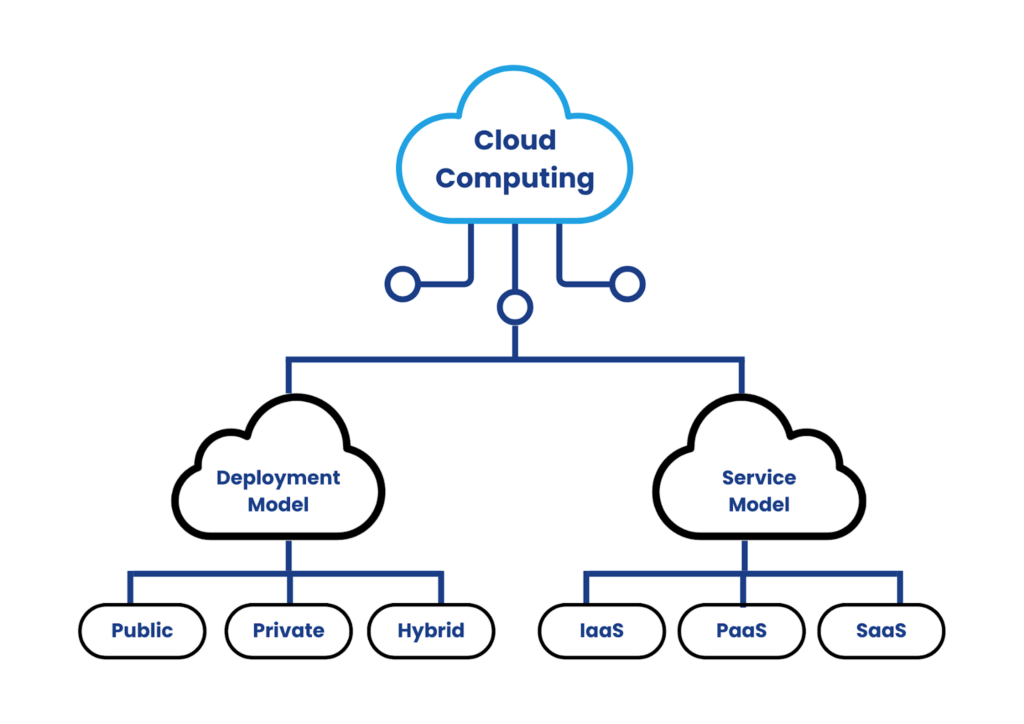
There are two models of cloud computing. Deployment models and Service Models. These models are divided into other sub models. 

Deployment Models

Deployment models in cloud computing refer to the structure of cloud structure and the authority over the resource management. These models determine where the cloud resources are located and who can access and manage them. There are 3 types of deployment models.

1. Public Cloud: Here, the cloud infrastructures are available to many people. The cost of public cloud is cheaper than the others. These public clouds are owned by the cloud providers like AWS, Microsoft Azure and other cloud providers. 

2. Private Cloud: This cloud infrastructure is accessed and organised by a specific organization. Only that organization can operate with that cloud service. 

3. Hybrid Cloud: This cloud is the mixture of both private and public cloud. Users can enjoy the combination of both service features through this model. 

Service Models

Service models determine the level of control of cloud servers. These models determine how the cloud servers can give services towards customers. Service models are as well categorized into 3 types. 

1. IaaS: Infrastructure as a service or IaaS is a cloud service model where users can access basic computing infrastructure. It is often used by IT administrators for accessing only storage or virtual machines. But they will have to manage data, applications and middleware. 

2. PaaS: Platform as a Service or PaaS provides cloud platforms runtime for developing, managing and testing applications. This model offers customers to deploy applications without acquiring or managing. Customers only have to manage applications and data. 

3. SaaS: Software as a Service or SaaS offer hosting and managing applications for clients. Here everything is managed by the service provider. 

Impact of Cloud Computing in IT Infrastructure

Cloud computing has changed the way of managing and handling big datasets. Nowadays, every organization is dependent on cloud services. There are many reasons why cloud computing is more effective than other ways of managing data. 

Cost Efficiency & Scalability

Traditional IT infrastructure requires heavy upfront investments in hardware and maintenance. Cloud computing eliminates these costs by offering pay-as-you-go models. It helps businesses to scale resources up or down based on demand.

Enhanced Security & Compliance

Cloud providers invest heavily in security. Thus they can offer advanced encryption, identity management, and compliance certifications. This makes cloud infrastructure more secure than many on-premise setups.

Remote Work & Collaboration

With cloud-based tools like Microsoft 365 and Google Workspace, teams can collaborate in real time from anywhere. This shift has become essential in the era of remote and hybrid work.

Disaster Recovery & Business Continuity

Cloud computing ensures data is backed up and recoverable in case of hardware failure, cyberattacks, or natural disasters. Manually, data recovery process is very difficult. 

AI & Big Data Integration

Cloud platforms provide the computing power needed for AI, machine learning, and big data analytics. Businesses can leverage these technologies without investing in expensive hardware.

That’s how cloud computing is impacting the IT infrastructure for different industries. In Bangladesh, Synesis IT is helping modernize how businesses and public services use technology in Bangladesh. Synesis IT provides cloud-based solutions for everything from government e-services to enterprise-level apps. By helping organizations shift to the cloud, Synesis IT enables them to reduce costs, improve service, and prepare for a digital future. 

The Future of Cloud Computing

As cloud computing technology is updating day by day, there are huge possibilities in this sector. Also, the providers are adopting renewable energy to reduce carbon footprints. Moreover, quantum technology can be also integrated with cloud computing. Companies like IBM are making quantum computing accessible via the cloud. 

Cloud computing is the future of IT infrastructure. From cost savings and scalability to AI integration and remote work support, cloud computing empowers organizations to innovate and grow efficiently. As technology evolves, companies that invest in cloud computing today are building a strong foundation for tomorrow. Whether you’re a startup or an enterprise, now is the time to leverage the cloud computing based IT strategy.

Unlocking the Power of Large Language Models (LLMs) in Business Communication

Unlocking the Power of Large Language Models (LLMs) in Business Communication

Business communication has become one of the most essential parts for enterprises. Businesses are becoming more dependent on internal and external communication for better productivity, customer engagement, and decision making. These business communications now can be improved by using Large Language Models (LLM). These advanced models are helping businesses in faster communications and customer satisfaction.

How Large Language Models (LLM) Work? 

Large Language Models are systems that work with a huge amount of data. It is a process of learning from data and acting according to that. These are computer programs that use a technology called Neural Networks to predict the outcomes from previous large sets of data. Inside these Large Language Models, there can be found a neural network containing trillions of parameters that captures complexity of patterns in a language. Nowadays, many AI platforms like ChatGPT, DeepSeek, Google Gemini, etc. use Large Language models to understand, generate and manipulate human language.

Now, these models can be used in businesses for different purposes. From content management to writing coding, everything can be managed and optimized by Large Language Models. LLM can reshape the business communication processes easily. LLM is adapted in different companies worldwide.  Microsoft, Google, IBM, Amazon, etc. companies are using Large Language Model in their business. In Bangladesh companies like Synesis IT, Pathao, Robi Axiata etc. companies are adapting LLM technologies. 

LLMs Roles in Business Communication

LLMs are helping businesses both internally and externally to become more productive and efficient. These models are revolutionizing the way of customer engagement, communication, data analysis, content optimization and many more. These are some ways LLMs are taking business communication to the next level. 

Language Translation

Language barriers have been minimized with the help of Large Language Models (LLM). Companies like Google, Duolingo use LLM for language translation. Because of this solution, business communication has become much smoother worldwide. It also has increased the scope of businesses for global connections. 

Generating Contents Efficiently

Using Large Language Models, businesses can generate content ideas easily. LLM can analyze market situations and can also predict the customer behaviors from the previous learned data. Using LLM as a strong tool, marketers can easily generate unique ideas and contents that save time and money for the businesses. 

Improving Internal Communication

Large Language Models are also becoming handy in internal business communication. LLM are used in summarizing emails, different documents and proposals. These can also automate these communication processes by its natural language processing ability. Thus, organizations can be more efficient and collaborative, increasing business success. 

Monitoring & Analyzing Customer Behaviours

Enterprises can analyze customer behaviour and sentiments by using Large Language Models. LLM can be used to analyze social media conversations to learn the pattern of consumer behaviours. Meta is utilizing it heavily to learn about peoples behaviours and later offer them the services according to their needs. 

Automated Chatbots & Voicebots 

Using a large Language Model, businesses can build chatbots that can handle customer queries and confusions on their own. For small business owners this can be a good solution to handle customers. People don’t have to wait 24/7 for providing support to the consumers. LLM provided virtual assistants can give instant and accurate information improving consumer satisfaction. LLMs are trustworthy sources for specific and rapid query replying. 

Large Language Models effectively handle frequent queries from customers by being trained to respond based on suitable data, which simplifies the workload for human customer support teams. LLMs also improve customer engagement and provide customer interactions by enabling conversational algorithms. By providing individualized quick answers to customer inquiries, LLM optimizes business operations. Almost every organization worldwide is using LLM based AI chatbots. In Bangladesh, Synesis IT has used LLM in their 333 call center and EC chatbot system to solve citizens’ inquiries efficiently.

Prospect of Large Language Models (LLM) in Business

The learning capacity of Large Language Models (LLM) are improving day by day. The language processing from the huge and continuous updated dataset is making LLM smarter than before. This can be a huge opportunity for businesses in the near future to run the business world using the LLM model saving billions of dollars. This will give humans more time to enjoy their lives and focus on more important things. Many industries are already leveraging this technology for their better business operation and customer satisfaction. Be in international companies like Google, IBM, Nvidia or local companies like Synesis IT, Brain Station 23, bKash, many companies are integrating LLM into their businesses. In the near future, every enterprise will be doing the same, improving business communication all over the world. 

In the near future, every business will be heavily dependent on Artificial Intelligence (AI). And, to leverage AI, the Large Language Model (LLM) is the best tool to utilize in business communications. Whether its internal or external business communication, the Large Language Model can be used as a transformative force. If enterprises can utilize the potential of Large Language Models properly, there will be no communication barriers in businesses around the world.  

Essential Tech Trends of 2026 Every Tech Leader Should Know

Essential Tech Trends of 2026 Every Tech Leader Should Know

Why Tech Trends Of 2026 Feel Different

Something shifted in 2026. It’s not that we suddenly have a bunch of shiny new tools but that the rules of the game have changed. Leaders now need speed and proof together. You need delivery that is fast and safe. You also need records that explain what happened. 

That’s a harder balance to strike than it sounds.


Tech Trends of 2026 matter because they change what leaders must control. Governed AI needs clear limits and logs. Identity-first security verifies every user and service request. Data boundaries reduce leaks and mistakes. Cloud cost discipline prevents waste. Software integrity and tested recovery keep outages smaller and faster to fix.

Let’s talk through them honestly.

Tech Trends Of 2026 At A Glance

Most leaders feel the same pressure right now. You need faster delivery, fewer incidents, and clearer audit trails. The trends below are the ones shaping daily decisions in 2026.

  • Governed AI that is useful, limited, logged, and owned
  • Identity-first security for people and service accounts
  • Data boundaries with simple rules and real enforcement
  • Cloud cost discipline tied to workload placement and ownership
  • Software integrity with fast recovery and strong visibility

Governed AI Becomes A Managed Capability

AI use keeps spreading across teams. It shows up in support, planning, coding, and reporting. 

The problem is that most organizations let it grow without asking a very simple question: ‘what is this thing actually allowed to touch?’ If your AI assistant can read customer support tickets, it probably shouldn’t also have access to payroll data. If it can draft code, it shouldn’t be pushing that code to production on its own. If it summarizes meetings, those summaries shouldn’t be floating outside your internal walls..

The shift in 2026 isn’t about getting more AI. The key shift is more control around it. Leaders should set a few defaults that are hard to skip. 

  • Every AI tool needs a real human owner, someone who approves what it connects to and answers when it misbehaves
  • Log what prompts go in and what outputs come out, especially for anything high-stakes
  • Block unknown integrations by default; require people to intentionally turn things on
  • For anything that moves money, sends messages, or changes records — a human should still be the one pulling the trigger

Ownership matters more than policy text. Every AI workflow needs an owner. That owner handles changes and incidents. They approve connectors and data access. They also decide what gets reviewed.

Human review should be reserved for high-impact actions. That includes sending messages, changing records, and granting access. It also includes actions that move sensitive data. And here you need a kill switch for AI. If an AI feature starts doing something weird, you should be able to shut it down in minutes, not days. Treat it like any other service running in production.

You also need a safe way to shut it off. If an AI feature misbehaves, you must stop it fast. It is the same discipline you use for any production service. 

Identity First Security Becomes The Main Gate

Many organizations still trust the network too much. That trust breaks in modern work. Your apps live across five different clouds. Your team works from home, from coffee shops, from planes. Trusting “the network” doesn’t mean much anymore.

This year, identity becomes the main gate for access. That gate must work for people and services. It must also work for every request, not only logins.

This isn’t as complicated as it sounds if you start with the basics:

  • Single sign-on wherever you can get it
  • Multi-factor for anything sensitive which should not be optional.
  • Separate the accounts your admins use daily from the accounts they use to make big changes
  • Kill shared logins (yes, even “just for that one tool”)

Service accounts need the same attention. Long-lived tokens create silent risk. Hard-coded keys create hidden debt. Leaders should push for shorter-lived credentials and clean rotation. They should also push for least privilege rules that match real needs.

Good identity control is not only a login screen. There are also continuous checks. A user can be valid at 9am. They can be risky at 9:20. Device state can change. Location can change. Behavior can change. A practical system can react by tightening access when signals look wrong.

Logs are part of the control. You need proof of who did what. You also need proof of who tried. Make sure admin changes are logged. Make sure access grants are logged. Make sure sensitive reads are logged. Then review those logs with owners on a steady cadence.

Data Boundaries Get Clearer And More Enforced

Data spreads faster than most policies. It moves through chat, tickets, files, and meetings. It also moves through AI prompts and AI outputs. Most organizations have a data policy document somewhere. Very few have controls that actually follow the data. That is why data boundaries become a daily concern.

The fix doesn’t have to be complicated. Four labels is plenty for most teams: Public, Internal, Confidential, Restricted. The labels don’t matter as much as what happens when someone tries to break the rule. If the enforcement only exists in a PDF that nobody reads, you don’t have enforcement. You have decorations.

Enforcement must match how work happens. If a rule only lives in a document, it will fail. Put controls where data moves. Control file sharing by domain. Control external invites by policy. Control downloads for Restricted content. Control exports from systems that store sensitive records. Control how recordings and transcripts are stored and shared.

Here is the part many leaders miss, and it is the most important part. Data boundaries are not only about storage. They are about paths. A path is how data is created, shared, processed, and deleted. If you do not map paths, you will miss the real risks. Start with the paths that carry the most sensitive data. Include support tickets and attachments. Include meeting recordings and transcripts. Include shared drives and email forwarding. Include analytics exports and reporting downloads. Include AI inputs and AI outputs. When you map these paths, you can place controls at the right points. You can also remove risky steps that do not add value. That is how governance becomes real work, not a document.

Evidence matters as much as rules. When something goes wrong, you also need to be able to answer for it. Ask yourself: can I export a log of who accessed this? Can I show how retention is being enforced? If you can’t answer those questions today, that’s worth fixing before someone asks you under pressure.

Cloud Cost Discipline Becomes A Core Leadership Skill

Cloud computing & storage was supposed to make everything cheaper and more flexible. For a lot of teams, it’s become a monthly surprise on the finance call.

Cloud cost discipline starts with visibility and ownership. You need to know which team caused the spend. You need to know which environment caused it. You need to know which product feature drove it. If cost is not tied to owners, alerts will be ignored.

A strong cost practice focuses on the top drivers. It does not try to review everything. It asks why the cost rose and what changed. It looks for idle resources and over-sized systems. It checks for runaway logging, tracing, and storage growth. It checks data egress and cross-region traffic. Those are common sources of surprise.

If you want cost control without slowing delivery, focus on a few repeatable defaults. Explain why these defaults matter, then enforce them with owners.

  • Shut down idle development and test environments
  • Set limits for logs and traces
  • Right-size databases after peak periods
  • Review storage retention and tiers
  • Track egress and cross-region traffic

The point isn’t to make teams feel guilty for spending. It’s to connect spend to outcomes. If you’re spending more, you should be able to say what you got for it.

Software Integrity And Fast Recovery Become
Non Optional

This year, cyber attacks often target the build and deploy path. The risk is simple. You ship something you did not mean to ship. This can happen through compromised packages, leaked secrets, or unsafe build runners.

Software integrity is about proving what runs in production. You want to know where the code came from. You want to know who approved it. You want to know what changed since the last release.

Start with strong source control habits. Protect main branches. Require reviews for sensitive changes. Limit who can approve production deploys. Track dependency use and remove what you do not need. Keep secrets out of code and out of logs.

Build systems also need hardening. Isolate build runners. Rotate credentials. Avoid shared build keys across projects. Store artifacts in controlled registries. Keep an audit trail from commit to artifact to deploy. Even a simple audit trail improves investigation speed.

Fast recovery is the partner of integrity. Even with good controls, incidents happen. Vendor outages happen. Human mistakes happen. The winning teams recover quickly and learn quickly.

Recovery needs tested backups and tested restores. A backup that you never restore is only hope. Leaders should ask teams to run restore tests on critical systems. They should also ask for clear runbooks that match real incidents.

Visibility makes recovery faster. Observability helps teams answer basic questions. What changed. What failed first. Who was affected. What fixed it. Logs, metrics, and traces matter only when they shorten time to clarity. Leaders should push for alerts that are actionable and owned. They should reduce noisy alerts that train teams to ignore signals.

How To Decide Which Trends Deserve Focus

Not every trend deserves investment. Tech Trends of 2026 can feel endless, and that creates fatigue. Leaders need a filter that stays practical.

A good filter has an impact on risk and operating cost. If a trend does not change either, treat it as optional. Also ask if it changes daily work. If it changes daily work, teams need defaults and training. If it changes the threat model, teams need monitoring and response paths. If it increases lock-in, teams need exit options and data portability.

When you evaluate a new tool or approach, look for clear outcomes. Use a short set of questions that teams can answer.

  • Does it reduce delivery time in real workflows
  • Does it reduce leak or outage risk
  • Does it improve audit and troubleshooting speed
  • Does it reduce total work across teams
  • Does it have a safe rollback path

If you cannot show at least one outcome, delay adoption. In 2026, focus is a competitive advantage.

Set Your Defaults For 2026

You don’t need to overhaul everything at once. Pick one critical system, the one that would hurt most if it broke or leaked. You can apply these defaults:

  • AI tools have owners, limits, and logs
  • Access is identity-first, with continuous checks
  • Data is labeled and the paths are mapped
  • Cloud spend is tied to team ownership
  • Your build pipeline has an audit trail
  • Recovery runbooks exist and have been tested

Get it right on one system. Make the evidence visible. Then repeat.

That’s not a transformation project. That’s just good engineering discipline. In 2026, it’s what separates teams that stay fast from teams that stay anxious.

The Role of AI in Digital Transformation for Enterprises

The Role of AI in Digital Transformation for Enterprises

Why AI In Digital Transformation Matters Now

AI is now a core part of digital transformation for enterprises. It helps teams automate repeated work, analyze large volumes of data, and respond faster to customers and market changes. Recent enterprise research shows AI use is now common across business functions, but many organizations still struggle to scale it well.

AI in digital transformation helps enterprises automate work, improve decisions, and deliver better customer experiences. It turns data into faster action and reduces manual effort across teams. When used in real workflows, AI supports growth, efficiency, and stronger operational control.

Digital transformation is the use of digital technology across an organization to improve processes, products, operations, and customer outcomes. AI strengthens that shift by making systems more adaptive, predictive, and useful in daily work. IBM defines digital transformation as a business strategy that modernizes operations across the organization, while IBM also describes AI transformation as the integration of AI into operations, products, and services to drive efficiency and growth.

That is why AI is no longer seen as a side experiment. For many enterprises, it is becoming part of how work gets done. It supports customer service, operations, planning, cybersecurity, and collaboration. A local example is Convay, which promotes AI-powered meeting minutes, transcription, and collaboration features as part of enterprise communication workflows.


How AI And Digital Transformation Connect

Digital transformation creates the foundation. AI adds intelligence to that foundation.

Most enterprises already use digital systems such as cloud tools, CRMs, ERPs, support platforms, analytics dashboards, and collaboration software. AI becomes useful when it improves those existing systems. It can sort information faster, detect patterns earlier, and help teams act with less delay. That is why AI in digital transformation works best when it is tied to real business processes instead of being treated like a separate trend.

This matters because many organizations are still learning how to move from isolated AI use cases to enterprise-wide value. McKinsey’s 2025 survey found AI use is widespread, but scaling practices such as governance, validation, roadmaps, and KPIs are still uneven. That means the opportunity is real, but execution still decides results.


How AI Improves Customer Experience

Customer experience is one of the clearest areas where AI creates value. Modern customers expect faster answers, more relevant service, and smoother support across channels.

AI helps enterprises meet those expectations through chatbots, virtual assistants, recommendation systems, and language tools. Natural language processing allows machines to understand and generate human language, which is why it powers many support and service experiences today. When used well, these tools reduce wait times and help teams personalize communication based on past behavior and current need.

This does not mean every customer interaction should be handed to automation. It means enterprises can use AI to handle repeatable requests, guide users faster, and give human teams more time for complex cases. That balance is often where customer experience improves the most.


How AI Raises Operational Productivity

Operational productivity has always been a core goal of digital transformation. AI helps by reducing manual work and speeding up decisions inside existing workflows.

Many enterprise processes still involve repetitive tasks such as data entry, document handling, routing, scheduling, ticket classification, and status updates. AI can automate parts of that work and reduce the burden on teams. Microsoft’s enterprise IT case studies describe AI as improving reliability, resiliency, and efficiency across internal operations, which is a strong example of how AI can support daily enterprise performance.

This is where AI in digital transformation becomes practical. The value is not just in saving time. The bigger gain often comes from fewer delays, better consistency, and more focus for people doing higher-value work.


How AI Supports Data Driven Decision Making

Enterprises generate data every day from customers, transactions, systems, suppliers, and internal teams. That data is valuable only when it can be turned into useful action.

AI helps process large volumes of structured and unstructured data faster than manual methods. Machine learning models can identify patterns, support forecasts, and help leaders make decisions with more context. IBM defines machine learning as the part of AI focused on learning from data patterns and making predictions or inferences without hard-coded instructions.

This makes AI especially useful for forecasting demand, monitoring performance, detecting anomalies, and improving planning. It does not remove the need for human judgment. It improves the speed and scale of analysis so teams can decide with better visibility.


How AI Creates Space For Innovation

AI does more than improve current work. It also creates room for new ideas.

When enterprises reduce repetitive tasks and improve visibility across operations, they free up time and budget for experimentation. Teams can test new service models, improve products faster, and respond to changing customer behavior with more confidence. AI can also support market analysis, product discovery, and content generation during early planning stages, which makes innovation cycles shorter and more practical.

This is one reason AI in digital transformation matters at the strategy level. It is not only about efficiency. It is also about giving enterprises more capacity to adapt, test, and improve.


How AI Strengthens Employee Performance

Many people still ask whether AI will replace employees. In most enterprise settings, that is the wrong question.

The more useful question is how AI changes the kind of work people do. Research and enterprise guidance increasingly frame AI as a tool for augmentation, not just replacement. IBM states that AI should enhance human intelligence with oversight, agency, and accountability, while Microsoft has described AI as a way to improve employee productivity and engagement.

That makes employee empowerment an important part of enterprise AI adoption. When AI handles repeatable tasks, people can spend more time on problem-solving, planning, relationship management, and creative work. The technology works best when teams are trained, supported, and given clear rules for how to use it well.


How AI Improves Cybersecurity And Risk Awareness

As enterprises digitize more of their work, the attack surface grows. That is why security and risk management must grow with it.

AI can support cybersecurity by monitoring activity, spotting unusual behavior, analyzing large volumes of signals, and helping security teams respond faster. Microsoft explains that AI for cybersecurity helps automate threat detection, identify patterns, and support real-time incident response. IBM also notes that AI tools can monitor for abnormalities in data access and alert teams to possible threats.

At the same time, AI introduces its own risks. NIST’s AI Risk Management Framework says AI risk management should be integrated into broader enterprise risk management. That means enterprises should not only ask what AI can improve. They should also ask how models are governed, validated, monitored, and controlled.


Common AI Solutions Enterprises Use

Enterprises usually do not adopt one single type of AI. They adopt a mix of capabilities that solve different problems across the business.

Machine Learning
Machine learning helps systems learn from data and improve over time. It is useful for forecasting, pattern recognition, demand planning, scoring, and classification.

Natural Language Processing
Natural language processing helps machines understand and generate human language. It is widely used in chatbots, search, summarization, transcription, and language-based support tools.

Computer Vision
Computer vision helps machines process and interpret images and video. It is commonly used in inspection, recognition, monitoring, and visual analysis tasks.

Robotic Process Automation
RPA uses software robots to automate repetitive digital tasks. It is useful in areas like billing, onboarding, claims handling, and back-office operations.

Predictive Analytics
Predictive models use past data to estimate likely future outcomes. Enterprises use them for demand planning, risk scoring, maintenance, and performance forecasting.

AI Driven Personalization
AI helps enterprises tailor content, support, and product suggestions based on user behavior and context. This improves relevance and can reduce friction in the customer journey.

AI For Cybersecurity
AI can help detect anomalies, prioritize alerts, and support faster response across complex environments. This is especially useful when security teams must monitor large volumes of activity.


What The Future Looks Like For Enterprises

The future of AI in digital transformation will likely be shaped by scale, governance, and workflow integration.

The direction is becoming clearer. Enterprises are looking for measurable value. The importance of leadership ownership, defined validation processes, and stronger adoption practices for turning AI into real business results. Microsoft also frames AI maturity as a staged journey rather than a one-time deployment.

That means successful enterprises will not win by adding the most AI features. They will win by choosing practical use cases, integrating AI into existing systems, and keeping human oversight strong. In the coming years, the gap may grow between companies that use AI as a business capability and companies that still treat it as a side experiment.


What Enterprises Should Do Next

AI in digital transformation is no longer just an idea for the future. It is already shaping how enterprises serve customers, run operations, manage risk, and support employees.

The smart next step is simple. Start with a real business problem. Tie AI to an existing workflow. Make sure the data is usable. Set clear ownership. Keep people in the loop. Then expand only when the first use case is working well. That is how enterprises turn AI from hype into durable value.


FAQs 

What is the role of AI in digital transformation for enterprises?
AI helps enterprises accelerate digital transformation by automating routine work, improving data analysis, supporting faster decisions, and enabling more responsive customer experiences. In practice, enterprise AI is now used across operations, service, analytics, and risk management rather than as a standalone tool.

How does AI improve customer experience in enterprises?
AI improves customer experience through chatbots, virtual assistants, language tools, and personalization systems. These tools help enterprises respond faster, reduce friction, and tailor support to customer behavior and context.

How does AI support data driven decision making in digital transformation?
AI can process large volumes of data faster than manual methods and identify patterns that help with planning, forecasting, and prioritization. That makes decision-making more scalable and often more timely when the underlying data is reliable.

What are the most common AI solutions used in enterprise digital transformation?
Common solutions include machine learning, natural language processing, computer vision, robotic process automation, predictive analytics, personalization systems, and AI-supported cybersecurity. Each solves a different part of the enterprise workflow.

Can AI improve cybersecurity and risk management for enterprises?
Yes. AI can help detect anomalies, identify suspicious behavior, and support faster response across networks and systems. But AI also creates new governance demands, which is why NIST recommends integrating AI risk management into broader enterprise risk management processes.

Will AI replace employees in enterprises?
In most enterprise settings, AI is being used to augment employees rather than fully replace them. The bigger challenge is usually adoption, training, and governance, which means people still remain essential for judgment, oversight, strategy, and problem-solving.